
Getting an SNGPL duplicate bill online takes just a few simple steps. Sui Northern Gas Pipelines Limited (SNGPL) offers digital billing services that allow customers to check their gas bills without visiting a customer service office.
A duplicate bill can help with payment, record keeping, checking outstanding dues, or keeping a digital copy for future use. Your SNGPL consumer number serves as the main detail required to access the bill.
What You Need for an SNGPL Duplicate Bill
Before starting the process, keep these details ready:
- SNGPL consumer number
- Mobile phone, tablet, or computer
- Working internet connection
- Printer, if you need a paper copy
- PDF reader, if you want to save the bill digitally
You can find the consumer number on an old SNGPL gas bill. The bill also contains billing information such as the billing month, issue date, due date, current charges, previous dues, and total payable amount.
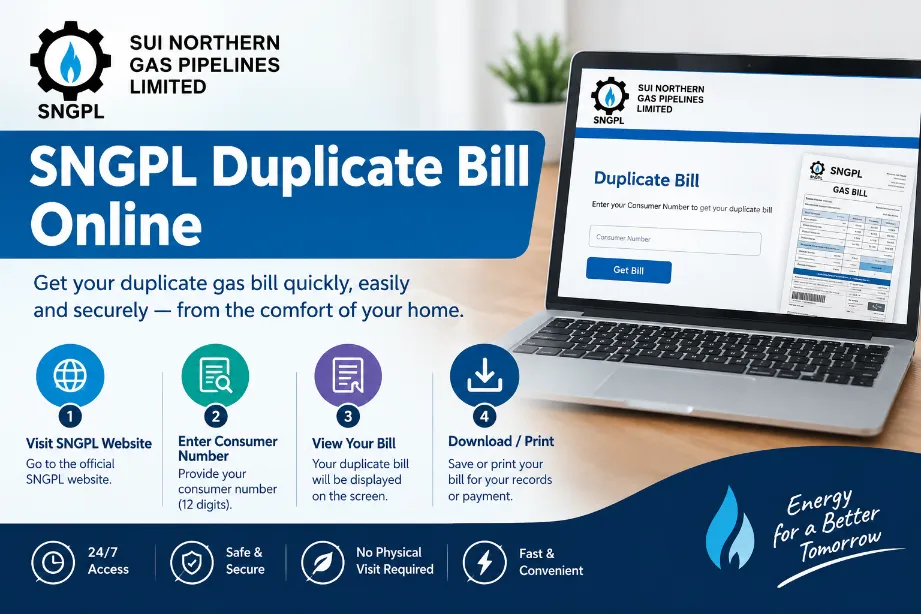
Steps to Get SNGPL Duplicate Bill Online
Follow these steps to access your latest gas bill:
- Open the official SNGPL website.
- Find the online bill or bill inquiry section.
- Enter your SNGPL consumer number.
- Enter the captcha or security code shown on the screen.
- Submit the entered information.
- Wait for the billing record to load.
- Check the displayed bill details.
- Use the print option to get a physical copy.
- Select the PDF option if you want a digital copy.
Check the consumer information, billing month, due date, and total amount before saving or printing the bill.
SNGPL Bill Details You Can Check
Your duplicate gas bill provides several billing details. The information can help you verify the amount before making payment.
| Bill Detail | Information |
|---|---|
| Consumer Number | Your SNGPL account identification |
| Billing Month | Period covered by the bill |
| Issue Date | Date the bill was generated |
| Due Date | Last date for regular payment |
| Gas Charges | Charges based on gas usage |
| Fixed Charges | Applicable fixed charges |
| Meter Rent | Applicable meter-related charge |
| GST | Applicable sales tax |
| Arrears | Previous unpaid amount |
| Current Bill | Charges for the current period |
| Total Amount Due | Amount payable |
The exact amount may vary according to gas consumption, consumer category, applicable rates, taxes, adjustments, and previous outstanding dues.
How to Print SNGPL Duplicate Bill
After your bill appears online, you can print it directly from your browser.
- Select the Print option.
- Choose your printer.
- Check the print preview.
- Select the required paper size.
- Print the document.
You can also save the document as a PDF instead of printing it. This option works well for customers who want to keep a digital record.
How to Download SNGPL Bill PDF
A PDF copy gives you a convenient way to keep your monthly gas bill on a phone or computer.
After opening the bill:
- Open the browser print menu.
- Select Save as PDF.
- Choose a folder on your device.
- Give the file a suitable name.
- Save the document.
You can use a name such as SNGPL-Bill-September-2026.pdf to find the document easily later.
A saved PDF can be useful for:
- Monthly record keeping
- Future payment checks
- Sending a bill to another person
- Printing another copy
- Keeping household utility records
How to Find Your SNGPL Consumer Number
Your SNGPL consumer number appears on your previous gas bill. Check the upper portion of the document for account information.
The bill may also show an Account ID or other reference details. Use the number requested by the SNGPL online bill service.
An old bill can make the process easier, especially for customers who have forgotten their consumer number.
SNGPL Duplicate Bill Through Mobile App
SNGPL also offers mobile-based services for customers. The available services can help users check bills, view billing history, print duplicate bills, and access other customer facilities.
Using a smartphone can save time for users who regularly check their gas bills.
Basic steps may follow this process:
- Open the SNGPL mobile application.
- Enter the required account details.
- Open the billing section.
- View the available bill.
- Save or print the duplicate copy.
- Use an available payment facility if you wish to pay the bill.
What to Do If the SNGPL Bill Does Not Appear
Sometimes an online bill may fail to load. Incorrect consumer information, browser problems, temporary website issues, or unavailable records can cause this problem.
Try these steps:
- Check your consumer number again.
- Refresh the webpage.
- Try another browser.
- Clear your browser cache.
- Check your internet connection.
- Try the service again later.
- Check an old bill for the correct consumer number.
- Contact SNGPL customer support for assistance.
Keep your previous bill nearby during a support request. It can provide useful account information for the customer service team.
SNGPL Helpline for Billing Problems
Customers facing billing problems can contact SNGPL through its customer service channels.
For billing-related complaints, SNGPL provides dedicated contact options. The customer can provide the consumer number, billing month, and details of the problem to help the support team review the case.
SNGPL has also promoted 1199 as a consumer helpline.
For a billing complaint, keep the following information ready:
- Consumer number
- Name of account holder
- Meter or account details
- Billing month
- Amount shown on the bill
- Description of the problem
Can You Get an Old SNGPL Bill?
SNGPL provides billing history through its digital customer services. Users may access previous billing records through available online or mobile facilities.
The availability of older bills can vary according to the account and records available in the SNGPL system.
For an older bill that does not appear online, contact SNGPL customer support and provide your account details.
SNGPL Duplicate Bill and Payment
After getting your duplicate bill, check the total payable amount and due date before making payment.
SNGPL customers can use available payment channels for their gas bills. These may include banking and digital payment facilities offered through participating service providers.
Check these details before payment:
- Consumer number
- Billing month
- Due date
- Current charges
- Previous dues
- Total amount payable
Keeping the payment receipt or digital transaction record can also help with future billing queries.
Benefits of Getting an SNGPL Bill Online
Online bill access offers several useful advantages:
- No need to wait for a paper bill.
- A duplicate copy can be obtained from home.
- A PDF can be saved on your device.
- A printed copy can be produced at any time.
- Billing information can be checked before payment.
- Previous billing records can help with monthly tracking.
- Mobile access makes bill checking convenient.
- Digital copies reduce the need to keep several paper bills.
SNGPL Duplicate Bill for Lost or Missing Bills
A lost paper bill does not prevent you from checking your current gas charges. The online billing facility provides a convenient way to access a fresh copy.
Enter the correct consumer information and view the available bill. You can then save the bill as a PDF or print another copy.
This can be particularly useful for households that receive their paper bill late or misplace it before the payment date.
Final Words
Getting an SNGPL duplicate bill online is a simple process. You mainly need your SNGPL consumer number to access the available billing record. After opening the bill, check the billing month, due date, current charges, previous dues, and total payable amount.
You can save the bill as a PDF or print a physical copy for your records. SNGPL also offers mobile-based customer services for bill checking and other account facilities.
For problems with missing bills, incorrect billing information, or online access, contact SNGPL customer support with your consumer details and billing information.


Visitor Rating: 5 Stars
sir mera Jan 2018 ka bill nahe mila sui gas
risalpur
I enter my consumer number but bill for the month of July,2015 is not available.
I am entering the consumer no but the duplicate bill is not availabile plz help
sometime due to overload link down so try after few movements and hours. thanks
I want my current bills. when i enter my consumer bills that No result fund please help me
i 2 giving my consumer no. but no bill find why
non issuence of the bill since last 5 months neither on web site
when ever complained nor a satisfing reply
Respected sir…This is humble repuest to you that please update your necessary data on web so everyone can check easily
I last month bill was not delivered to me now I am entering my consumer no to get the duplicate bill but no response, kindly tell me what to do
Unable to view bill online…..this issue has been present since the last two months….will someone please reply?
I tried to
find my bill but there was no response even after a long wait.
I am entering my consumer no 39928620002 but bill is not available ?? help pl
I am entering the who consumer No or Old no but it is unable to display the Bill.
Entered cunsumer no. But Bill is not available.
Plz Check and reply as soon as possible.
Thanks.
mera duplicate bill comuter me nahi aaraha hi is ko hal karo
I am entering the consumer no but the duplicate bill is not availabile plz help
sir mara es month ka bil nahi mila
I am entering my consumer number carefully to view my bill but no success. Similar was the position regarding last month’s bill.
No sngpl duplicate bill available. why?
I am entering the consumer No, Butt bill is not avavilable onlline // Plz healp me
i lost my bill plzzzz help me for duplicate bill
sir mera is month ka bil nae mila mera consumr # 79458479908 zahid mahmood s/o sharif azizabad burewala
I am entering the consumer No, but the bil is not available online?? plz help me.
Dear Sir,
I want to see my bill online,my Consumer # is 90132230005
My address is H.No. 41 Lane 1C Judicial Colony Chaklala
Rawalpindi.
I am entering the consumer No, Butt bill is not avavilable onlline // Plz healp me
Khai, Distt.M.B.Din
i am entring the consumer no. but billl is not avavliable online ?? help plz
I would like to thanks for this kindness
bill jan 2014
duplicate bill lahore