
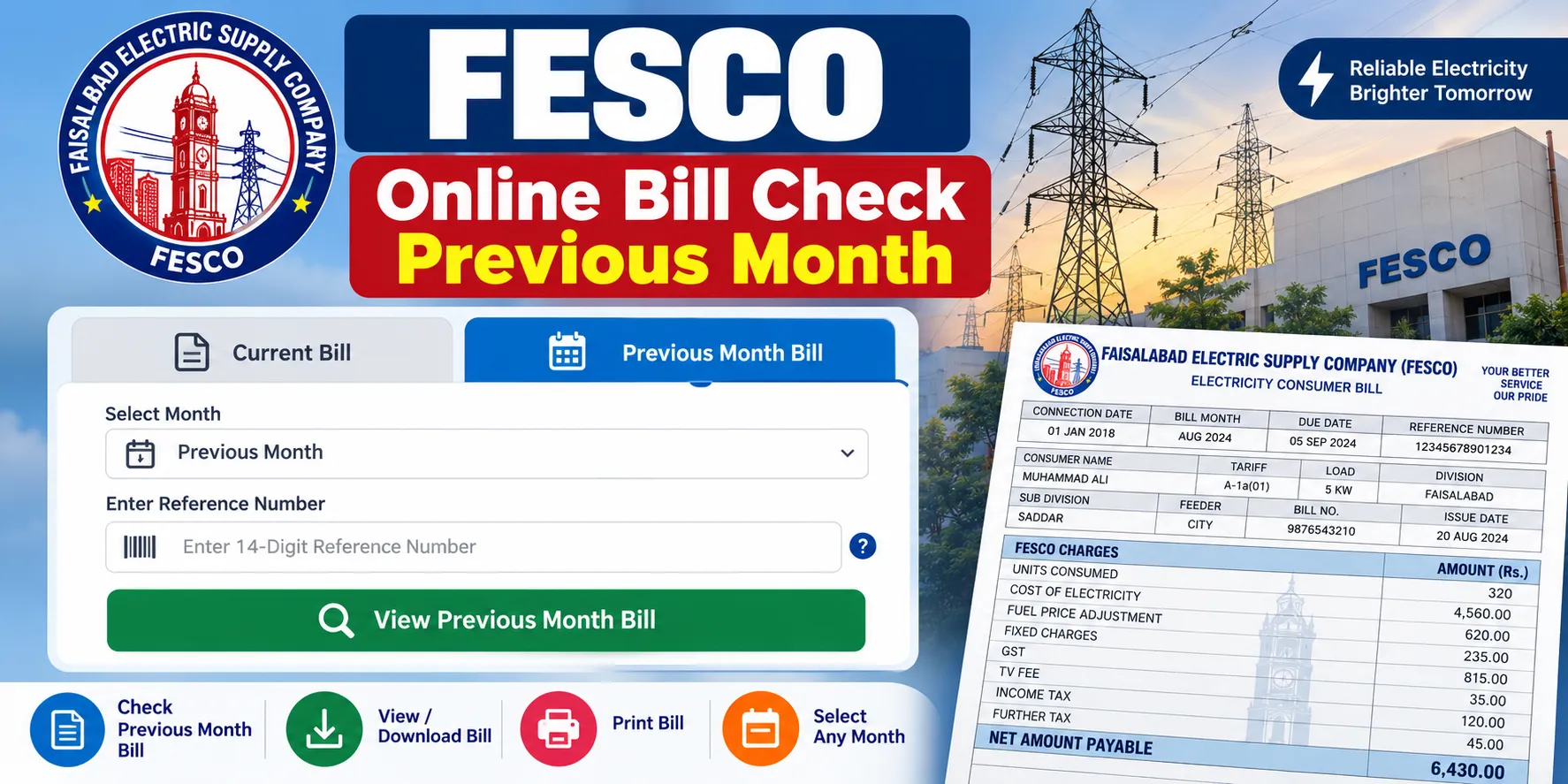
FESCO consumers may need an earlier electricity bill for payment verification, record keeping, meter reading review, or checking a previous amount. The FESCO Online Bill Check Previous Month method helps users locate billing information without waiting for a paper copy. An online bill can also make it easier to review the consumer details, billing month, due date, units used, payable amount, and other information printed on the electricity statement.
Faisalabad Electric Supply Company serves several areas of Punjab and provides electricity billing services to its consumers. For many users, keeping a copy of an old bill is useful, especially during payment disputes or account checks.
What Is a Previous FESCO Bill?
A previous FESCO bill refers to an electricity bill issued for an earlier billing cycle. The bill may show the meter reading, consumed units, tariff information, taxes, arrears, due date, and total payable amount.
A recent bill may not show every detail from an older billing cycle. For this reason, users who need an earlier statement may have to check the available online billing facility or contact a FESCO customer service office.
According to the consumer service material published through the regulatory framework, consumers with internet access can download electricity bills through the relevant distribution company’s website.
Information Needed for an Old FESCO Bill
Before starting an online search, keep the details from a recent FESCO bill nearby. These details can make the process much easier.
| Information | Purpose |
|---|---|
| Reference number | Identifies the electricity connection |
| Customer ID | Helps identify the consumer account |
| Billing month | Helps locate the required statement |
| Meter number | Useful for account verification |
| Previous bill copy | Helps confirm account details |
The reference number or customer ID generally appears on the electricity bill. Enter the information exactly as shown on the document.
FESCO Online Bill Check Previous Month Method
The online process starts with the current billing details. A user can visit the relevant FESCO bill-checking page and enter the required account information.
Follow these steps:
- Open the FESCO online bill service.
- Keep a recent electricity bill nearby.
- Locate the reference number or customer ID.
- Enter the required number in the bill-check field.
- Submit the details.
- Review the billing information shown on the screen.
- Check the billing month and amount.
- Save or print the available bill for your records.
The exact fields may vary according to the current website interface. A previous bill may also depend on the records available through the online system.
Can You See Last Month’s FESCO Bill Online?
A user may be able to view an earlier bill through the online system, but availability can depend on the billing record and the facility currently provided by FESCO.
A bill displayed online may show details such as:
- Consumer name
- Reference number
- Customer ID
- Meter number
- Billing month
- Previous meter reading
- Current meter reading
- Units consumed
- Electricity charges
- Government taxes
- Arrears
- Due date
- Total payable amount
Check the billing month carefully before saving a copy. A current bill and an older bill can show different readings and payment amounts.
Why Check a Previous FESCO Bill?
An old electricity bill can help in several practical situations. A consumer may need it to verify a payment, review electricity usage, check an unexpected increase, or keep financial records.
Common reasons include:
- Checking a previous payable amount
- Reviewing monthly electricity usage
- Verifying meter readings
- Checking arrears
- Confirming payment information
- Keeping household records
- Preparing documents for a billing complaint
- Comparing two billing cycles
- Checking tax and surcharge amounts
Previous bills can also help consumers identify changes in electricity consumption over different months.
How to Read an Old FESCO Bill
An electricity bill contains several sections. Some users may find the layout confusing because charges, taxes, readings, and account information appear in different areas.
Start with the basic account information. Confirm the consumer name, reference number, customer ID, and meter number. Then check the billing month and meter readings.
The units section shows electricity consumption for the billing period. The charges section can contain electricity costs, taxes, duties, and other applicable amounts.
Pay special attention to:
- Previous reading
- Present reading
- Units consumed
- Billing period
- Tariff category
- Current charges
- Arrears
- Taxes
- Total amount
- Due date
This information gives a clearer picture of how the final bill amount was calculated.
Previous Bill and Current Bill Details
Checking two bills side by side can help identify changes in consumption or charges. A table makes the review easier.
| Detail | Previous Bill | Current Bill |
|---|---|---|
| Billing month | Earlier cycle | Latest cycle |
| Meter reading | Earlier reading | Latest reading |
| Units | Earlier usage | Latest usage |
| Charges | Earlier amount | Latest amount |
| Arrears | Earlier balance | Latest balance |
| Due date | Earlier date | Latest date |
A higher bill does not always mean that electricity consumption increased. Tariff rates, taxes, arrears, meter readings, and other billing components can affect the final amount.
What to Do If the Previous Bill Does Not Appear
Sometimes an old bill may not appear through an online search. This can happen because of website maintenance, account data limitations, incorrect account information, or the way older billing records are stored.
Try these steps:
- Check the reference number again.
- Confirm every digit before submission.
- Try the customer ID instead of another account number, where available.
- Check a newer bill for updated account information.
- Refresh the billing page.
- Try the service again later.
- Keep a screenshot of any error message.
- Contact a FESCO customer service center for further help.
FESCO’s consumer service material also states that customer service centers can issue duplicate bills.
How to Save a FESCO Bill for Later
Once the required bill appears on the screen, save a copy immediately. A digital copy can be useful later, especially for payment records.
You can:
- Use the browser’s print option.
- Select “Save as PDF.”
- Print a physical copy.
- Store the PDF on your computer.
- Keep a copy on your phone.
- Rename the file using the billing month.
For example, a simple file name such as FESCO-Bill-August-2026.pdf makes future searches easier.
FESCO Bill Information to Check Carefully
An earlier bill should be reviewed before using it for a complaint or payment record. Small differences in readings or account numbers can create confusion.
Check these points:
- Consumer name
- Reference number
- Customer ID
- Meter number
- Billing month
- Meter readings
- Units consumed
- Current charges
- Previous balance
- Taxes
- Due date
- Total payable amount
A correct reference number is especially useful because it connects the bill with the electricity connection.
Is a Previous FESCO Bill Useful for a Complaint?
Yes. A previous bill can provide supporting information during a billing complaint. It can help show how the amount changed across billing cycles.
For example, a consumer may notice a large difference between two monthly bills. Keeping both copies allows the meter readings, units, charges, and previous balance to be reviewed together.
FESCO’s consumer service material provides procedures for billing complaints and also states that duplicate bills can be issued through designated customer service personnel.
Common Problems During Online Bill Checking
Several simple mistakes can prevent a bill from appearing.
- Wrong reference number: One incorrect digit can produce no result.
- Old account details: Account information may change after certain connection updates.
- Website problem: Temporary technical issues can affect the bill page.
- Incorrect billing month: The user may check the wrong cycle.
- Unavailable old record: Older billing data may not always be displayed through the online interface.
Check the information carefully before assuming that the bill does not exist.
Final Points About Previous FESCO Bills
A previous electricity bill can be useful for checking consumption, reviewing charges, confirming account information, and keeping payment records. The FESCO Online Bill Check Previous Month process starts with accurate account details such as the reference number or customer ID.
After opening the available bill, check the billing month, readings, units, charges, taxes, arrears, and payable amount. Save a PDF or printed copy for future use. For an older statement that cannot be retrieved online, a FESCO customer service center may provide another way to obtain a duplicate bill.


my name is muhammad rizwan and teacher in govt school. sir i need electricity bill the name of abdul karim quarashi s/o muhammad deen makan no k-49 mohallah miana mianwali.and the reference no is 07134510762100.sir becose some one change the bill authority. name ahmad hassan shah s/o muhammad ameen shah.we have to prove our court decission .sir plz help