
To register a phone with PTA in Pakistan, you need to use the Device Identification, Registration and Blocking System (DIRBS). The system checks your phone’s IMEI and connects the registration process with the Federal Board of Revenue (FBR) for applicable duties and taxes.
A phone brought from abroad may require registration before it can work with a Pakistani SIM for regular use. You can submit the request online through the DIRBS portal, use the *8484# service from a local SIM, or visit a mobile operator franchise.
What Is PTA Phone Registration?
PTA phone registration means adding the phone’s IMEI to Pakistan’s DIRBS system so the handset can operate on local mobile networks under the applicable rules.
The process mainly applies to phones that enter Pakistan from abroad or devices that do not already have compliant registration status.
DIRBS checks the IMEI and can validate whether the device has a valid, non-duplicated and non-stolen IMEI.
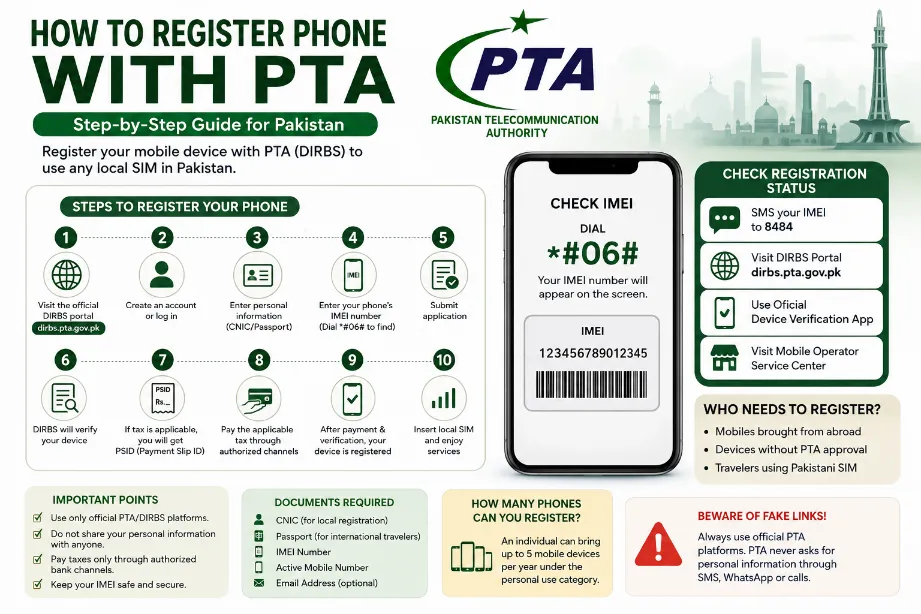
Information Required for PTA Registration
Keep the following details ready before starting the registration:
| Requirement | Details |
|---|---|
| IMEI number | Your phone’s unique device identification number |
| CNIC | Required for registration under the local personal category |
| Passport | Required for applicable international-traveler registration |
| Mobile number | A local SIM may be required for certain procedures |
| Email address | Useful for receiving registration-related information |
| Payment details | Needed if FBR duties and taxes apply |
You can find the IMEI by dialing *#06# on the phone. It may also appear on the phone box or inside the device settings.
How To Register Phone With PTA Online
Follow these steps for online registration:
- Open the official DIRBS Device Registration System.
- Create an account or sign in to your existing account.
- Enter the required personal information.
- Select the applicable registration category.
- Enter your phone’s IMEI number.
- Submit the application.
- DIRBS checks the IMEI and processes the request.
- If taxes or duties apply, the system generates a Payment Slip ID (PSID).
- Pay the applicable amount through an authorized payment channel.
- After the required payment and verification, the device registration process is completed.
The DIRBS portal is the main online route for mobile-device registration.
How To Register PTA Phone Through *8484#
You can also start the registration process through the *8484# USSD service using a local SIM. PTA’s published guidance lists this option for mobile-device registration.
Dial:
*8484#
Follow the options shown on the screen and provide the requested information.
This option can be useful for users who prefer a mobile-based process instead of using the web portal.
How To Check IMEI Before PTA Registration
The IMEI number plays a central role in the registration process.
To find it:
- Open the phone dialer.
- Enter *#06#.
- Your IMEI number will appear on the screen.
- For dual-SIM phones, you may see two IMEI numbers.
- Save each IMEI carefully before submitting the application.
You can also find the IMEI on the original phone packaging or within the handset settings.
How To Check PTA Registration Status
You can check the registration status of a mobile device through official PTA channels.
One method is to send the phone’s IMEI number by SMS to:
8484
PTA has also advised consumers to use the official DIRBS website or its official Device Verification App for device-status checks.
| Method | What You Need |
|---|---|
| SMS | IMEI number |
| DIRBS website | Internet connection and device details |
| Device Verification App | Smartphone and IMEI |
| Mobile operator service center | Phone and required documents |
PTA Phone Registration Tax and Duties
PTA does not set or collect the mobile-device import taxes. Applicable duties and taxes fall under the FBR process, while PTA handles the device registration side through DIRBS.
The amount can vary according to the phone, applicable tax rules and the registration category.
Before making a payment, check the amount generated through the official DIRBS process rather than relying on an unofficial calculator or an agent.
How PSID Works for PTA Mobile Registration
After DIRBS processes the device information, an applicable tax or duty amount may be generated through the FBR system.
The system can generate a Payment Slip ID (PSID) for payment. The applicant can then pay the amount through available authorized banking channels.
The basic process is:
- Submit IMEI information.
- DIRBS validates the device.
- FBR calculates applicable duties and taxes.
- A PSID may be generated.
- Pay the amount through an authorized channel.
- Registration is processed after the required payment and verification.
PTA Registration for Phones Brought From Abroad
A phone brought from another country for use with a Pakistani SIM may require DIRBS registration.
International travelers can register eligible devices through the online portal or use the customs kiosk facility at international airports.
The registration process can require:
- Passport number
- CNIC number
- IMEI number
- Relevant travel information
- Other details requested by DIRBS
How Many Phones Can You Register With PTA?
Government guidance states that an individual can bring up to five mobile devices per year under the personal-use category.
This rule applies to the personal-use category and should not be confused with commercial imports.
Temporary PTA Registration for Overseas Pakistanis and Foreign Visitors
Overseas Pakistanis and foreign nationals visiting Pakistan can use the temporary mobile registration facility for personal handset use.
The temporary facility allows an eligible visitor to register one personal mobile device for up to 120 days. The service operates through the DIRBS portal and is intended for temporary visits.
Applicants may need to provide:
- Passport number
- Arrival date
- Intended departure date
- Local SIM issued in their name
- IMEI number of the phone
What Happens If a Phone Is Not PTA Registered?
A non-compliant phone can lose access to Pakistani mobile networks under DIRBS rules.
For a device brought from abroad, users should complete the required registration and payment process within the applicable period. FBR’s DIRBS guidance states that a device using a local SIM can face blocking after the relevant deadline if the required registration and taxes have not been completed.
PTA Phone Registration Through Mobile Franchise
Users can also get assistance at a cellular operator’s service center or franchise.
PTA has listed cellular operator franchises as another route for accessing the registration facility.
Take your phone and the required personal information with you. For registration under a passport category, keep the relevant passport information available.
Important Points Before Registering Your Phone
Keep these points in mind:
- Check the IMEI before starting the process.
- Dual-SIM phones can have multiple IMEI numbers.
- Use the official DIRBS platform for registration.
- Check the tax amount generated by the official system.
- Pay duties through authorized channels.
- Check the device status after registration.
- Avoid links received through suspicious SMS or WhatsApp messages.
- Do not give your personal information to unknown agents.
PTA has warned users about fake links and messages that falsely claim to offer DIRBS services. The authority advises consumers to use official platforms and the 8484 shortcode for device-status checks.
Common Problems During PTA Phone Registration
Some users may face issues during the registration process.
IMEI rejected:
The submitted IMEI may fail validation because of an invalid, duplicated or problematic IMEI.
Tax amount appears:
This means applicable duties and taxes may be due before the device can receive compliant status.
Device already registered:
The IMEI may already have a registration record.
Incorrect information:
A mismatch in CNIC, passport or device information can delay the process.
Phone blocked:
A blocked handset may require completion of the applicable registration and payment requirements before network service returns.
PTA Phone Registration Checklist
| Check | Status |
|---|---|
| Find IMEI | ✓ |
| Check IMEI status | ✓ |
| Open DIRBS | ✓ |
| Enter personal details | ✓ |
| Submit IMEI | ✓ |
| Check PSID/tax amount | If applicable |
| Pay required amount | If applicable |
| Check final device status | ✓ |
Final Words on How To Register Phone With PTA
The easiest route for How To Register Phone With PTA is the official DIRBS system. Start by checking your IMEI, submit the required details, review any applicable FBR duties and taxes, and complete the payment through an authorized channel.
After processing, check the device status through DIRBS or by sending the IMEI to 8484. Using official PTA and FBR channels can also help protect your personal information from fake registration services.
FAQs
How can I register my phone with PTA?
You can register it through the DIRBS online portal, use *8484# from a local SIM, or visit a cellular operator’s service center or franchise.
How do I find my phone’s IMEI?
Dial *#06# on your phone. The IMEI can also appear in the phone settings or on the original box.
Is PTA registration free?
The registration process itself can involve no separate PTA processing fee, but applicable FBR duties and taxes may apply to an imported device.
Can I check PTA status through SMS?
Yes. PTA advises users to send the IMEI number to 8484 to check device status.
Can overseas visitors register a phone temporarily?
Yes. Eligible overseas Pakistanis and foreign visitors can use the temporary registration facility for one personal handset for up to 120 days.
How many phones can an individual bring under the personal-use category?
Government guidance states a limit of up to five mobile devices per year under the personal-use category.