Zong prepaid customers can send part of their available mobile balance to another Zong number through the balance-sharing service. The process uses a USSD menu, so no internet connection or mobile app is required.
How To Share Zong Balance?
The Zong balance share service can be accessed by dialing:
*828#
After dialing the code, a menu appears with the available balance-sharing options. Enter the recipient’s Zong number, select the amount, and confirm the transaction.
| Service | Code |
|---|---|
| Zong Balance Share | *828# |
| Network | Zong |
| Service | Balance transfer |
| Access method | USSD |
| Internet required | No |
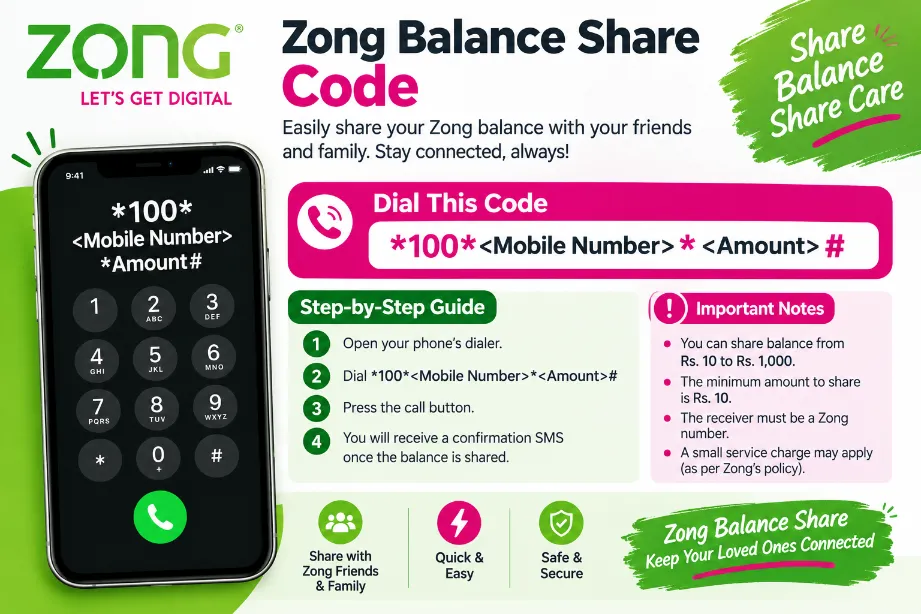
How to Share Zong Balance
Use these steps to send balance to another Zong number:
- Open the dialer on your mobile phone.
- Enter
*828#. - Press the call button.
- Follow the options shown in the USSD menu.
- Enter the recipient’s Zong mobile number.
- Enter the balance amount.
- Check the transaction details.
- Confirm the request.
A confirmation message can appear after the transaction has been processed successfully.
Zong Balance Share Code Details
The *828# code opens the balance-sharing service on a Zong prepaid SIM. The menu guides you through the transfer rather than requiring a separate application.
Before confirming a transfer:
- Check your available balance.
- Enter the recipient’s number carefully.
- Check the amount you want to send.
- Review any service charge displayed.
- Confirm the transaction only after checking the details.
Zong Balance Share Charges
A service charge may apply to a balance-sharing transaction. Charges can change according to the operator’s current tariff.
The USSD menu can show applicable charges during the transfer process. Check the displayed amount before confirmation so you know how much balance will be deducted from your account.
| Item | Details |
|---|---|
| Transfer service | Zong Balance Share |
| Service charge | May apply |
| Charge check | USSD menu |
| Payment method | Existing mobile balance |
Zong Balance Share Limit
Zong may set minimum and maximum amounts for balance transfers. The available limits can change, so the current USSD menu provides the most relevant information during a transaction.
| Transfer Detail | Status |
|---|---|
| Minimum amount | Check through *828# |
| Maximum amount | Check through *828# |
| Transfer fee | May apply |
| Recipient | Zong number |
Keeping sufficient balance in your account can help prevent a failed request.
Who Can Share Zong Balance?
Zong prepaid customers can use the service to send balance to another Zong user. It can be useful for family members, friends, or another personal Zong number.
Common uses include:
- Sending emergency mobile credit
- Helping a family member
- Sharing balance with a friend
- Providing credit for calls or SMS
- Transferring a small amount without visiting a retailer
Things to Check Before Balance Transfer
A few simple checks can reduce the chance of an unsuccessful transfer:
- Make sure your Zong account has enough balance.
- Check the recipient’s mobile number.
- Check the amount entered in the USSD menu.
- Keep enough balance for any applicable fee.
- Read the confirmation screen before approving the request.
Take extra care with the recipient’s number because a transfer made to the wrong number may not be easy to reverse.
Zong Balance Share vs Recharge
Balance sharing and mobile recharge serve different purposes. With balance sharing, an existing Zong customer sends part of their balance to another eligible Zong number. A recharge adds new credit to a mobile account through a retailer, banking service, app, or other recharge channel.
| Feature | Balance Share | Recharge |
|---|---|---|
| Source of credit | Existing account balance | New payment |
| Recipient | Another eligible Zong number | Selected mobile number |
| Internet needed | No | Depends on method |
| USSD option | Available | Depends on recharge method |
Can Zong Balance Be Shared With Other Networks?
The Zong balance-sharing service is intended for eligible Zong numbers. It should not be treated as a method for transferring Zong mobile balance directly to Jazz, Ufone, or Telenor accounts.
For another network, use a suitable recharge or payment service.
What Happens After Sharing Balance?
After a successful transfer, the sender’s available balance is reduced by the transferred amount and any applicable service charge. The recipient receives the transferred credit in their Zong account.
A confirmation SMS may provide transaction details. Check your account balance if you want to verify the deduction.
Zong Balance Share Code Not Working
Several issues can prevent a balance-sharing request from completing. Try the following:
- Dial
*828#again. - Check your available balance.
- Verify the recipient’s Zong number.
- Check the transfer amount.
- Review the limits shown in the USSD menu.
- Retry after a short period if there is a temporary network problem.
For persistent issues, Zong customer support can provide assistance with the account or transaction.
Zong Balance Share Code at a Glance
| Question | Answer |
|---|---|
| Zong balance share code | *828# |
| Service type | Balance transfer |
| Network | Zong |
| Internet required | No |
| Recipient | Eligible Zong number |
| Service fee | May apply |
| Current transfer limits | Check through USSD |
The Zong Balance Share Code provides a simple USSD method for sending mobile balance to another Zong number. Dial *828#, follow the menu instructions, enter the recipient’s number and desired amount, then review the transaction before confirmation. Check the applicable fee and transfer limit displayed during the process.