
Traffic laws help keep Karachi’s roads safer for everyone. With the introduction of electronic traffic enforcement systems, checking traffic fines has become much easier than visiting a traffic office. How to Check e Challan Karachi Online is one of the most searched topics among vehicle owners who want to verify whether their car or motorcycle has received a traffic violation. Understanding the process allows you to stay informed, avoid additional penalties, and resolve outstanding challans on time.
Whether you drive a motorcycle, car, SUV, or commercial vehicle, knowing how to check your e-Challan online can save time and help you maintain a clean driving record.
What Is an e-Challan?
An e-Challan (Electronic Challan) is a digital traffic ticket issued when a driver violates traffic regulations. Instead of relying only on manual enforcement, traffic authorities use surveillance cameras, ANPR (Automatic Number Plate Recognition) systems, and traffic personnel to identify violations.
Once a violation is recorded, the information is linked with the vehicle registration, and a challan is generated electronically.
Common violations include:
- Over-speeding
- Jumping a red light
- Wrong-way driving
- Illegal parking
- Driving without a helmet
- Seat belt violations
- Using a mobile phone while driving
- Lane discipline violations
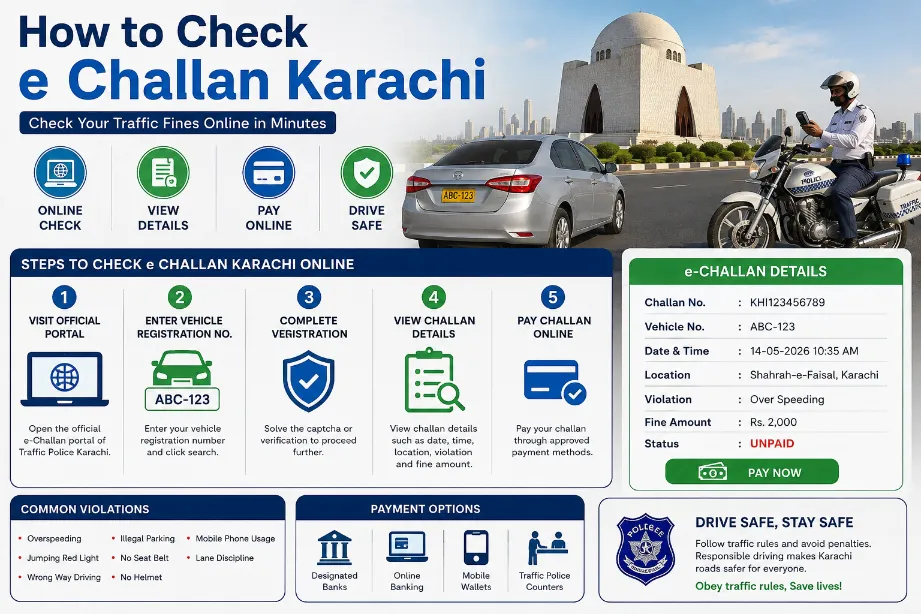
Why Should You Check Your e-Challan Regularly?
Many people remain unaware that their vehicle has received a traffic fine until much later. Regularly checking your e-Challan offers several benefits.
Stay Updated
- You immediately know whether any new violation has been recorded.
Avoid Additional Problems
- Ignoring traffic fines may create complications during vehicle verification or other official procedures.
Pay Fines on Time
- Checking regularly allows you to pay penalties before they remain pending for a long period.
Maintain Responsible Driving Habits
- Knowing your traffic history encourages safer driving practices.
Information Required Before Checking e-Challan
Before checking your traffic challan, keep the following details ready:
| Required Information | Purpose |
|---|---|
| Vehicle Registration Number | Main identification |
| CNIC (if required) | Identity verification |
| Mobile Number | Verification or notifications |
| Internet Connection | Access online portal |
Usually, the vehicle registration number is enough for checking available challans.
How to Check e Challan Karachi Online
If you want to know How to Check e Challan Karachi, follow these simple steps.
Step 1: Open the Official e-Challan Portal
Visit the official traffic police or e-Challan checking portal for Karachi.
Always use official government platforms to ensure accurate and secure information.
Step 2: Enter Vehicle Registration Number
Type your complete registration number exactly as it appears on your registration certificate.
Example:
- ABC-123
- KAA-4567
Double-check for typing mistakes.
Step 3: Complete Verification
Some portals may ask you to complete a CAPTCHA or verification code.
This helps protect the website from automated searches.
Step 4: Submit Your Search
Click the Search or Check Challan button.
The system will retrieve your traffic record.
Step 5: View Challan Details
If your vehicle has any outstanding fines, the portal usually displays information such as:
- Challan number
- Date of violation
- Time
- Location
- Nature of offence
- Fine amount
- Payment status
Understanding Your e-Challan Details
Once the results appear, review every section carefully.
Challan Number
- Every traffic challan has a unique identification number.
Date and Time
- Shows exactly when the violation occurred.
Violation Location
- Displays the area where traffic rules were violated.
Offence Type
Examples include:
- Over-speeding
- Signal violation
- Illegal parking
- Wrong-way driving
Fine Amount
- The payable penalty according to applicable traffic regulations.
Payment Status
Usually marked as:
- Paid
- Unpaid
- Pending
How Camera-Based e-Challan Works
Karachi uses modern traffic monitoring systems to improve road safety.
The process generally follows these steps:
- Traffic cameras monitor roads.
- A violation is detected.
- Number plate recognition identifies the vehicle.
- Vehicle registration data is matched.
- An electronic challan is generated.
- The owner can view the challan online.
This automated process improves accuracy while reducing manual paperwork.
Can You Check e-Challan Using CNIC?
Some official services may also allow searches using a CNIC, depending on the platform and verification requirements.
However, the vehicle registration number remains the most common and reliable search method.
Types of Vehicles Covered
Most registered vehicles can be checked, including:
- Motorcycles
- Cars
- Jeeps
- SUVs
- Vans
- Pickup trucks
- Commercial vehicles
- Government vehicles (where applicable)
Common Reasons for Receiving an e-Challan
Drivers often receive electronic challans due to avoidable mistakes.
Some common violations include:
Over-Speeding
- Driving beyond the posted speed limit.
Red Signal Violation
- Crossing the stop line after the traffic light turns red.
Wrong-Way Driving
- Driving against the permitted traffic direction.
Illegal Parking
- Parking in restricted or no-parking zones.
Seat Belt Violation
- Not wearing a seat belt while driving.
Helmet Violation
- Motorcyclists riding without approved helmets.
Mobile Phone Usage
- Using a phone while driving distracts the driver and increases accident risk.
Lane Discipline
- Changing lanes carelessly or ignoring designated lanes.
Benefits of the Online e-Challan System
The digital system offers many advantages.
Saves Time
- No need to visit traffic offices simply to check fines.
Easy Access
- Available anytime through an internet connection.
Improved Transparency
- Drivers can see the exact reason for each violation.
Better Record Keeping
- All challans remain digitally stored.
Reduced Paperwork
- Electronic records simplify traffic management.
Tips to Avoid Receiving an e-Challan
Safe driving is the easiest way to avoid penalties.
Follow these simple practices:
- Always obey traffic signals.
- Wear your seat belt.
- Wear a helmet when riding a motorcycle.
- Observe speed limits.
- Avoid using mobile phones while driving.
- Park only in designated areas.
- Follow lane markings.
- Keep vehicle documents updated.
- Maintain your vehicle properly.
- Stay alert in school and residential zones.
How to Pay an e-Challan in Karachi
After checking your challan, the next important step is paying any outstanding fine. Timely payment helps you avoid unnecessary complications and ensures your traffic record remains up to date.
Depending on the latest procedures introduced by the relevant authorities, payment options may include:
- Designated bank branches
- Official digital payment channels
- Government-approved online payment services
- Traffic police facilitation centers
Always use official payment methods to ensure your payment is recorded correctly.
Steps to Pay an e-Challan
Although the exact process may change over time, it generally follows these steps:
Step 1: Verify the Challan
Before making any payment, confirm:
- Vehicle registration number
- Challan number
- Fine amount
- Type of traffic violation
Step 2: Choose an Approved Payment Method
Use only authorized government payment channels.
Avoid paying through unofficial websites or individuals.
Step 3: Complete the Payment
- Enter the required information and pay the exact amount shown on the challan.
Step 4: Save Your Receipt
After payment:
- Download the digital receipt (if available)
- Keep a printed copy if required
- Save the payment confirmation for future reference
Step 5: Verify Payment Status
- Return to the official e-Challan portal after some time and check whether the challan status has changed from Unpaid to Paid.
What Happens If You Ignore an e-Challan?
Ignoring traffic fines is never recommended.
Depending on the applicable traffic laws and administrative procedures, unpaid challans may lead to:
- Accumulation of pending fines
- Difficulties during vehicle-related services
- Delays in official verification processes
- Additional legal or administrative action where applicable
Checking your e-Challan regularly helps prevent such situations.
Common Problems While Checking an e-Challan
Sometimes users encounter issues when trying to check their traffic fines online.
No Challan Found
Possible reasons include:
- No traffic violation has been recorded.
- The violation has not yet been uploaded.
- The registration number was entered incorrectly.
Solution: Verify the registration number and try again after some time.
Website Not Loading
Heavy traffic or scheduled maintenance may temporarily affect the portal.
Solution:
- Refresh the page.
- Try again later.
- Use a different browser or internet connection.
Incorrect Vehicle Details
If the displayed vehicle information does not match your records:
- Double-check the registration number.
- Contact the relevant traffic authority for assistance.
Paid Challan Still Showing as Pending
Payment updates may take some time.
If the status does not change after a reasonable period:
- Keep your payment receipt.
- Contact the relevant support office for verification.
How Long Does It Take for an e-Challan to Appear?
There is no fixed timeframe for every case.
The appearance of an electronic challan depends on factors such as:
- Verification of the recorded violation
- Data processing
- System updates
- Administrative approval
For this reason, checking your vehicle’s status periodically is a good practice.
Can Someone Else Check Your Vehicle’s e-Challan?
Yes. Since most systems primarily use the vehicle registration number, anyone with that information may be able to check whether a challan exists.
However, sensitive personal information is generally protected and may require additional verification before being displayed.
Can You Contest an Incorrect e-Challan?
If you believe an e-Challan was issued by mistake, you should:
- Gather relevant evidence (such as photographs or documents, if available).
- Keep a copy of the challan details.
- Contact the appropriate traffic authority through official channels.
- Follow the prescribed dispute or review procedure.
Do not ignore a challan simply because you think it is incorrect. Use the official process to seek clarification or correction.
Safety Tips to Avoid Traffic Violations
Responsible driving reduces the risk of accidents and fines.
Follow these practical tips:
Drive Within Speed Limits
- Speed limits are set for the safety of all road users.
Stop at Red Signals
- Always wait for the green light before proceeding.
Wear Safety Equipment
- Seat belts for drivers and passengers
- Helmets for motorcycle riders
Stay Focused
Avoid:
- Texting
- Calling without a hands-free system
- Other distractions while driving
Follow Lane Markings
- Changing lanes responsibly improves traffic flow and safety.
Park Responsibly
- Only park in authorized areas to avoid unnecessary penalties.
Keep Your Vehicle Roadworthy
- Regular maintenance helps ensure compliance with safety regulations.
Advantages of the Digital e-Challan System
The shift to electronic traffic enforcement benefits both authorities and road users.
Faster Processing
- Traffic violations are recorded and processed more efficiently than traditional paper-based methods.
Greater Accuracy
- Camera-based systems reduce the possibility of manual recording errors.
Transparency
- Drivers can view detailed information about recorded violations.
Convenience
- Vehicle owners can check their challan status from home without visiting an office.
Better Traffic Management
Electronic enforcement encourages greater compliance with traffic laws, contributing to safer roads.
Understanding How to Check e Challan Karachi is an important part of responsible vehicle ownership. With online verification systems, vehicle owners can easily check the status of their traffic fines using their registration number, review violation details, and complete payments through approved channels.
Rather than waiting for a notification or discovering an unpaid challan during an official process, make it a habit to check your vehicle’s record regularly. A few minutes spent reviewing your e-Challan status can save time, prevent inconvenience, and encourage compliance with traffic regulations.
As traffic enforcement technology continues to improve, staying informed and following road safety rules remain the most effective ways to avoid penalties and ensure a smooth driving experience.
Is checking an e-Challan online free?
Yes. Official portals generally allow users to check the status of their vehicle’s e-Challan without any charge.
What information do I need to check my challan?
In most cases, you only need the vehicle registration number. Some services may ask for additional verification details.
Can I check multiple vehicles?
Yes. You can search each registered vehicle separately by entering its registration number.
Can I check old paid challans?
Depending on the official portal, previous paid challans may also be available in the vehicle’s traffic record.
How often should I check my e-Challan status?
If you drive regularly in Karachi, checking once every few weeks or before important vehicle-related procedures is a sensible habit.
Is the online challan record updated immediately?
Not always. There may be a short processing period before newly issued challans appear or paid challans are marked as settled.