
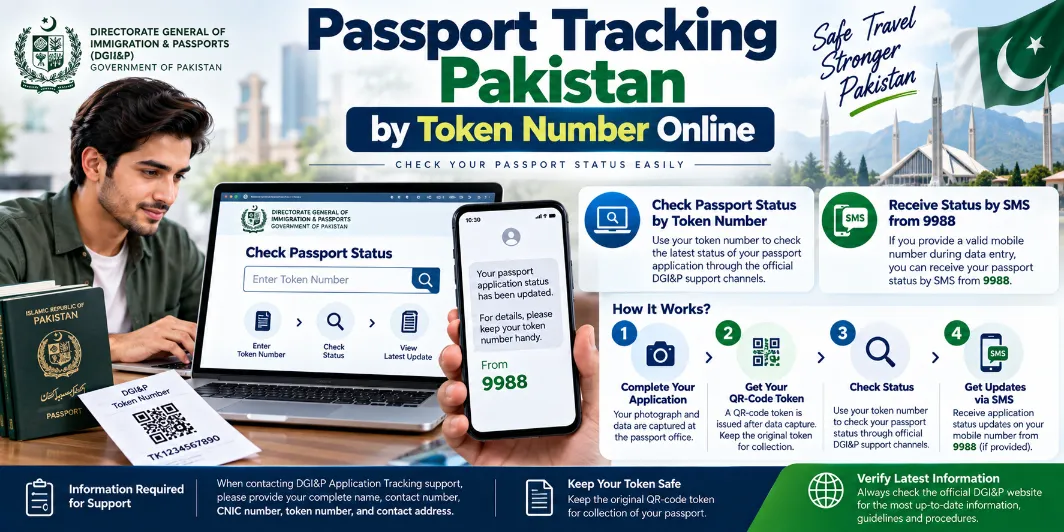
Passport Tracking Pakistan by Token Number Online allows applicants to check the progress of a passport application after submitting documents at a passport office in Pakistan. A token number is issued during the application process and works as an important reference for the applicant.
Applicants can use their token details, CNIC information, mobile number and other application details to ask about passport processing. The Directorate General of Immigration & Passports (DGI&P) also provides SMS-based status updates and contact facilities for passport applicants.
What Is a Passport Token Number?
A passport token number is issued during the passport application process at a passport office. It contains application-related information and helps the relevant staff identify the applicant’s record.
The token should be kept safely until passport collection because it may be required during the final collection stage.
| Information | Details |
|---|---|
| Issuing department | Directorate General of Immigration & Passports |
| Token purpose | Passport application identification |
| SMS service | 9988 |
| National helpline | 051-111-344-777 |
| International helpline | 0092-51-111-344-777 |
| Main identification | CNIC and token number |
How to Track Passport by Token Number
Applicants can follow a few simple steps to check their passport application status:
- Keep the passport token available.
- Check the token number carefully.
- Keep your CNIC number ready.
- Check SMS notifications received from the passport service.
- Contact DGI&P for an application-tracking query.
- Provide your token number and personal information to the relevant representative.
- Contact the passport office for further assistance where required.
For a tracking query, applicants may need to provide their full name, CNIC number, token number, contact number and address.
Check Passport Status Through SMS
DGI&P provides an SMS service for passport status information. Applicants can receive updates through 9988 after providing a valid mobile number during the application process.
The mobile number should remain active so that passport-related messages can reach the applicant.
Important points include:
- Keep the registered mobile number active.
- Check incoming SMS messages regularly.
- Save the passport token.
- Keep your CNIC information available.
- Contact DGI&P for unclear status messages.
Passport Tracking Through Helpline
Applicants can contact the DGI&P helpline for passport application queries. The department provides a national helpline for applicants inside Pakistan and a separate international dialing format for applicants outside the country.
| Service | Number |
|---|---|
| DGI&P helpline in Pakistan | 051-111-344-777 |
| International contact | 0092-51-111-344-777 |
| SMS passport status | 9988 |
| General email | [email protected] |
A passport applicant should keep the token number and CNIC details available during a call. These details can help staff locate the relevant application record.
Information Required for Passport Tracking
Applicants should keep several details ready before contacting the passport department.
- Full name
- CNIC number
- Passport token number
- Contact number
- Contact address
- Passport application details
The token number remains particularly useful for applications submitted through a passport office.
Passport Application Process After Receiving a Token
Passport processing involves several stages after token issuance. The application moves through biometric capture, data entry, verification and other processing steps before the passport reaches the delivery stage.
| Stage | Process |
|---|---|
| 1 | Applicant reaches the passport office |
| 2 | Photograph and token issuance |
| 3 | Fingerprint and biometric recording |
| 4 | Data entry |
| 5 | Record verification |
| 6 | Interview and decision |
| 7 | Passport processing |
| 8 | Passport delivery |
Applicants should check the information printed on the token and report any error to the relevant passport office.
Passport Status Not Showing
A passport application may require processing time before a new status update appears. Several internal stages take place between application submission and final delivery.
Applicants can take these steps:
- Check the token number again.
- Confirm the registered mobile number.
- Check SMS messages from 9988.
- Keep the CNIC number ready.
- Contact the DGI&P helpline.
- Ask the relevant passport office about the application.
- Provide complete application details during a tracking query.
A missing update does not automatically mean that there is a problem with the passport application.
Passport Delivery After Processing
After the required processing stages are completed, the passport moves toward delivery. Applicants collecting a passport from the designated office should keep the original token with them.
The token can serve as an important record during collection, so applicants should avoid losing or damaging it.
Online Passport Application Tracking
Online passport applications use an online tracking reference rather than the same physical-office token used for applications submitted at a passport office.
Applicants using DGI&P’s online passport service should keep their Online Tracking ID available. This ID can be used for queries related to an online application.
Token Number vs Online Tracking ID
These two references serve different purposes.
| Reference | Purpose |
|---|---|
| Passport Token Number | Applications submitted through a passport office |
| Online Tracking ID | Online passport applications |
| CNIC Number | Applicant identification |
| Mobile Number | Status notifications and contact |
Using the correct reference can make a passport-status query easier.
Passport Tracking for Overseas Applicants
Pakistanis living outside the country can also contact DGI&P regarding passport-related services. Overseas applicants should keep their passport application details, CNIC information and relevant tracking reference available.
For an online application, the Online Tracking ID can help with application-related queries. Applicants should also keep copies of submitted documents and application information for their records.
What to Do After Losing the Passport Token
Losing a token can create difficulties during a passport-status query or collection process. The applicant should contact the relevant passport office or DGI&P for assistance.
Keep these details available:
- CNIC number
- Full name
- Application details
- Registered mobile number
- Passport office information
- Approximate application date
The department can provide guidance about the next step based on the application record.
Important Passport Tracking Tips
- Keep the original token in a safe place.
- Take a clear photo of the token for personal records.
- Keep your CNIC information available.
- Use the registered mobile number for passport updates.
- Check SMS notifications from 9988.
- Save any passport-related messages.
- Use the Online Tracking ID for online applications.
- Contact DGI&P for application-specific questions.
Passport Tracking Contact Information
The DGI&P provides contact channels for applicants who need assistance with passport applications. Applicants should provide accurate information during a tracking request.
For an application query, keep the following details ready:
| Required Detail | Purpose |
|---|---|
| Full name | Applicant identification |
| CNIC number | Identity verification |
| Token number | Application reference |
| Contact number | Communication |
| Address | Applicant information |
| Online Tracking ID | Online application reference |
Passport Tracking Pakistan by Token Number Online gives applicants a practical way to follow their passport application and request status information. The token number remains an important reference for applications submitted at a passport office.
Applicants should keep the token, CNIC number and registered mobile number safe throughout the passport process. SMS service 9988 and DGI&P contact channels can also assist applicants with passport-status queries.