Jazz customers can check their remaining internet MBs, call minutes, and SMS through short USSD codes, the Jazz World app, and other account-checking options. These methods help users see their available package resources before they expire.
Jazz Remaining MBs and Minutes Code
The main Jazz codes can vary according to the package or offer active on a SIM. A general balance inquiry code may show account resources, while package-specific codes can provide more detailed information.
| Service | Jazz Code / Method | Purpose |
|---|---|---|
| Main balance | *111# | Check prepaid balance |
| Package status | *117# | Access selected Jazz package services |
| Internet resources | Package-specific code | Check remaining MBs |
| Call resources | Package-specific code | Check remaining minutes |
| Account details | Jazz World App | View active bundles and resources |
For an exact package balance, the code printed in the package activation SMS can provide the most accurate result. Jazz may also change USSD menus and package codes over time.
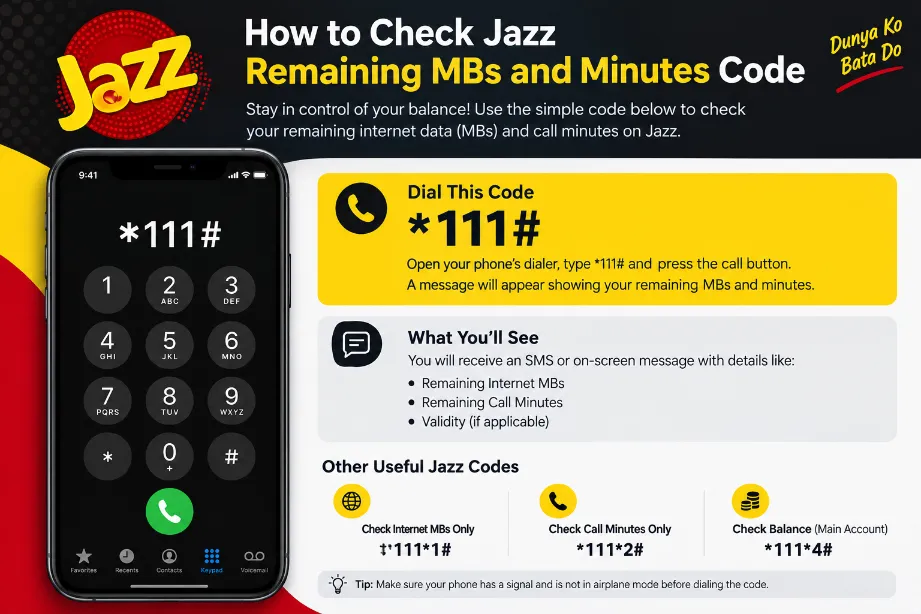
How to Check Jazz Remaining MBs
Jazz users can check their remaining internet volume through the Jazz World application or the relevant USSD menu.
Follow these steps:
- Open the phone dialer.
- Enter the Jazz internet/package inquiry code linked to your active offer.
- Press the call button.
- Wait for the USSD response.
- Check the available MBs and package expiry information.
The Jazz World app gives a more detailed view because it can show the active package, remaining data, minutes, SMS, and expiry date in one place.
How to Check Jazz Remaining Minutes
The remaining call minutes depend on the bundle activated on the SIM. Many Jazz offers have their own inquiry code.
A simple method is:
- Open the dialer on your Jazz SIM.
- Enter the inquiry code provided for your active bundle.
- Send the request.
- Read the response showing the remaining call minutes.
Users who have multiple active offers should check their package details in the Jazz World app for a clearer resource count.
Jazz Balance Check Code
The Jazz prepaid balance can generally be checked through:
*Jazz Balance Code: 111#
After dialing the code, the network displays the available balance or relevant account menu. Standard balance checking and package-resource checking are separate services, so a normal balance inquiry may not show all remaining MBs and minutes.
Check Jazz MBs and Minutes Through Jazz World App
The Jazz World app provides a convenient account dashboard for Jazz subscribers. It can display package resources without requiring separate USSD codes.
The process is simple:
- Install the Jazz World app.
- Sign in with the Jazz mobile number.
- Open the account or package section.
- View remaining internet MBs.
- Check available call minutes.
- Review SMS resources and package expiry.
The app can also show active offers and available bundles, making it useful for users who have more than one package.
Jazz Internet MB Check
Jazz internet bundles come with different data volumes and validity periods. A user may have daily, weekly, or monthly internet resources.
For an accurate Jazz MB check, use the inquiry option connected to the active internet package. The response can show:
- Remaining MBs
- Package expiry
- Bundle name
- Remaining validity
- Related account resources
A package can expire even with unused MBs, so checking both the remaining volume and validity period helps avoid confusion.
Jazz Minutes Check
Jazz call bundles may offer on-net minutes, off-net minutes, or a combination of both. The available balance depends on the specific offer.
| Resource | What to Check |
|---|---|
| Jazz minutes | Remaining on-net call resources |
| Other-network minutes | Off-net call resources |
| Internet | Remaining MBs |
| SMS | Remaining messages |
| Validity | Bundle expiry date |
A package with separate on-net and off-net resources may show each category independently.
Why Jazz Users Should Check Remaining Resources
Checking package resources before making calls or using mobile data can help prevent unexpected deductions from the main balance.
Useful reasons include:
- Avoiding unnecessary balance deductions
- Checking package expiry
- Monitoring mobile data usage
- Confirming successful package activation
- Tracking remaining call minutes
- Checking SMS resources
Regular checks can also help users decide whether they need another bundle before the current package expires.
Jazz USSD Codes for Account Checking
USSD codes work directly through the mobile network and do not require mobile data. This makes them useful for users who have little or no internet access.
| Check | Method |
|---|---|
| Main prepaid balance | *111# |
| Package resources | Relevant package inquiry code |
| Internet resources | Active bundle inquiry |
| Call minutes | Active bundle inquiry |
| Full package details | Jazz World App |
USSD menus can change, so users should rely on the code shown with their current Jazz offer for package-specific resource checks.
Jazz Remaining MBs and Minutes Not Showing
A USSD response may fail or show incomplete information for several reasons. The package may have expired, the request may have failed temporarily, or the SIM may have more than one active offer.
Try these steps:
- Dial the inquiry code again after a short interval.
- Restart the phone.
- Check the active package in the Jazz World app.
- Confirm that the SIM has network coverage.
- Review the activation SMS for the correct inquiry code.
- Contact Jazz customer support for account-specific assistance.
Jazz Package Expiry Check
Remaining MBs and minutes have a validity period. Once the package expires, unused resources usually no longer remain available.
A package-status check can help you see:
- Activation date
- Expiry date
- Remaining MBs
- Remaining minutes
- Remaining SMS
- Bundle name
Keeping an eye on the expiry date is especially useful for weekly and monthly offers.
Jazz Remaining Resources Without Internet
USSD checking does not require an internet connection. Users can open the dialer and enter the relevant code directly from the Jazz SIM.
This method works well for basic account inquiries because it does not depend on Wi-Fi or mobile data.
Jazz Customer Support
For package-specific problems, Jazz customer support can provide account-level assistance. This is useful for cases involving incorrect resource deductions, missing bundle resources, failed activation, or an unclear USSD response.
Keep the active package name and mobile number ready during support requests.
Final Words
The easiest way to check Jazz resources depends on the type of information required. *111# can be used for a basic prepaid balance inquiry, while package-specific USSD options can show remaining MBs and minutes. The Jazz World app provides a broader account view with package resources, expiry details, and active offers in one place.
For the most accurate result, use the inquiry method supplied with the active Jazz package, especially for bundles that provide separate on-net minutes, off-net minutes, MBs, and SMS.